Backbone vs Streamtime

Built for studios that work by conversation.

We love Streamtime’s playful visual To-Do boards and its push to retire painful timesheets. Backbone brings that same calm clarity to the whole studio, adding bot-free meeting notes, proposals, contracts and Xero in one place.

Backbone

Streamtime product interface

Streamtime

Credit where it's due

Where Streamtime shines

Streamtime has long been a favourite of creative studios for making job planning and time tracking feel genuinely human.

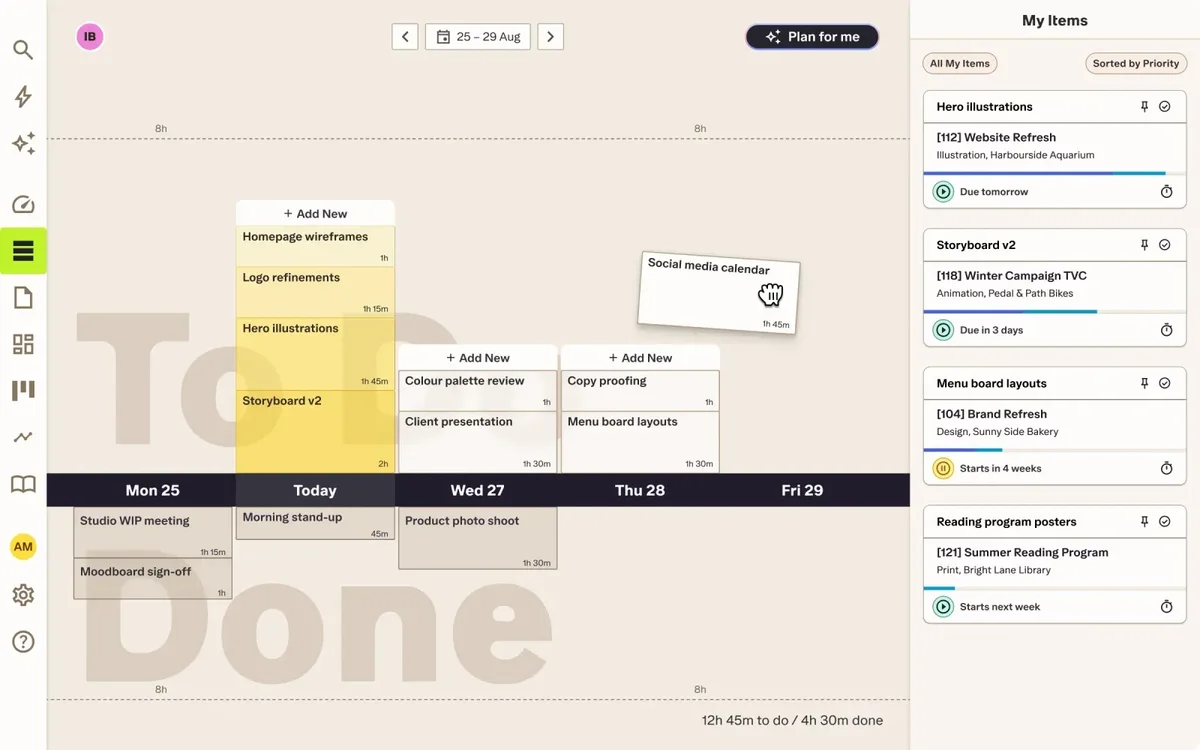
  • To-Do time without timesheets. Drag job cards across a daily To-Do view so time logs happen naturally.
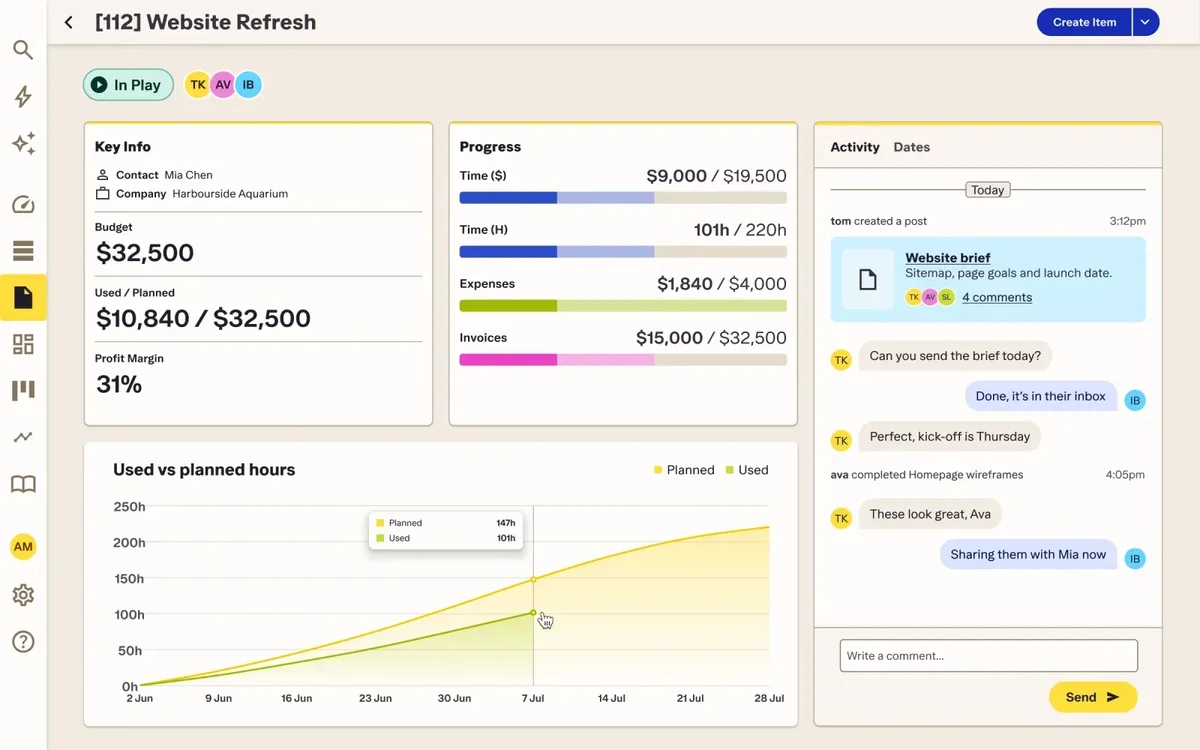
  • Clear job burn-up charts. See quoted budget against actual hours spent before a creative job drifts over.
  • Flexible ANZ accounting sync. Connects cleanly with Xero, MYOB and QuickBooks for smooth studio invoicing.
Streamtime feature view

Where Backbone goes further

Every brief captured. Every job connected.

Keep client conversations, tasks, schedules and proposals together instead of stitching tools.

Bot-free client call notes

Capture every brief and feedback call on Mac, iPhone and web without putting a bot in the room.

Tasks backed by real context

Open any task and read the exact client call that created it seconds ago.

Proposals, contracts and Xero

Send branded proposals, capture e-signatures and sync invoices straight into Xero from one record.

Private studio architecture

End-to-end encryption covers meetings, clients, projects, tasks and schedule, with per-organisation encryption for Xero, proposals and contracts.

Side by side

The details.

Backbone and Streamtime compared
FeatureBackboneStreamtime
Meeting capture
Native meeting notesBot-free capture on Mac, iPhone and webNo native meeting capture
Brief and feedback historyTranscripts linked straight to client projectsStored outside in separate note apps
AI summaries and actionsPrivate summaries turned directly into tasksRequires third-party AI notetaker
Studio job delivery
Daily task trackingClean tasks linked to calls and scheduleVisual To-Do cards with built-in time
Budget visibilityProject values, invoicing and schedule viewVisual job burn-up and margin bars
Resource planningSimple weekly team schedulingStudio schedule across jobs and people
Proposals and accounting
Proposals and e-signBuilt-in proposals and native contract signingQuotes and estimates, no native e-sign
Accounting integrationsNative Xero sync includedXero, MYOB and QuickBooks integrations
Pricing transparencyFrom A$99 a month for the whole organisationCustom value-based pricing via sales
Privacy and workflow
Encryption modelEnd-to-end core workspace, per-organisation Xero, proposals and contractsStandard cloud encryption in transit and rest
Sales pipelineNative client pipeline to signed contractLight quoting focused on active jobs
Workspace scopeCalls, CRM, projects, schedule, contracts, XeroCreative job planning, time and invoicing

An honest answer

Which should you choose?

Choose Streamtime if

  • Your studio loves visual To-Do time tracking and job burn-up charts.
  • You rely on MYOB or QuickBooks alongside your creative job workflow.
  • You prefer keeping call notes and contracts in separate dedicated tools.

Choose Backbone if

  • You want bot-free client call notes feeding directly into studio tasks.
  • You need proposals, e-signatures and Xero sync in one connected workspace.
  • You want transparent pricing without negotiating a custom value-based quote.
  • Strong encryption for client calls, projects and billing data is non-negotiable.
Get on the Waitlist

More comparisons

Backbone vs Productive

Deep agency budgets and rate cards versus Backbone’s connected workspace.

Compare with Productive

Backbone vs Scoro

Formal PSA quoting and Gantt charts compared with Backbone.

Compare with Scoro

Backbone vs Teamwork.com

Client portals and retainers compared with Backbone’s private studio record.

Compare with Teamwork.com

Backbone vs Notion

DIY docs and databases versus purpose-built client and Xero workflows.

Compare with Notion

Questions

How Backbone works.

Contact us
What is Backbone?

One encrypted record of your business, built from your meetings, email, calendar, invoices and project work. Your team works from it, and so do the AI tools you choose.

Can Backbone read my data?

No. Your record is encrypted on your devices before it reaches us, and your team holds the keys. What we store is unreadable to us.

What does the AI see?

Only what a request needs. Each question sends the content for that one answer to the AI model, and the answer is encrypted again before it is saved.

Which AI tools can use my record?

Claude, Codex, Cursor, VS Code and Windsurf connect through MCP, the open standard. You give each tool its own key and choose what it can read, change or send.

Does a bot join my meetings?

No. Backbone records from your Mac, your iPhone or your browser, so nothing extra joins the call.

What does it connect to?

Gmail, Google Calendar, Outlook Mail, Outlook Calendar, Microsoft Teams, Xero, Slack, GitHub, Linear and Sentry.

How does pricing work?

You pay for the organisation, not for each person. Everyone shares one pool of usage, and every plan starts with 14 days free.

Can I use my own AI?

Yes. Bring your own AI is one flat price for Backbone. You add your own provider and API keys, and the provider bills you directly.

Where is my data stored?

On servers in Australia.

Can I take my data with me?

Yes. You can export your whole record whenever you choose.

Give your business a Backbone.

Start with your next meeting. Each meeting adds to your record.

Early access

Get on the Waitlist

Backbone is opening up to service teams soon. Leave your work email and we will reach out when your spot is ready.